Changelog
New features, improvements, and fixes for Solair AI.
Version 3.1
LatestAugust 2026
Intelligence that works for you.
Solair 3.1 puts more intelligence in your pocket, and puts you in charge of it. Now you can build the apps you wish existed, hand off the things you check every morning, and keep everything you create, all without giving up the privacy you started with.
Build the App You Wish You Had
You have an idea. Now you can just say it. Describe the app you want, in a sentence, and intelligence turns it into a real one that lives on your phone and works without internet. A game for the commute. A calculator that fits how you think. A tracker for the one thing you keep forgetting.
- Say it or type it. Solair takes it from there.
- Not sure where to start? Nine ideas are ready to try.
- Four finished apps are already yours to explore: a budget tracker, a 3D solar system, a health dashboard, and a SpaceX briefing.
- Your apps can do more than ever: full 3D, dozens of images, and, when you allow it, a look at your own Apple Health data. Chart your steps. Watch your sleep. Every app asks first, and you can always say no.
- Every app gets its own icon, made for it, and lives in a grid on your phone.
- Open one and it fills the screen. Pinch, or reach for the handle, when you want the controls back.
- You choose how good the images inside your app should be, and you see the cost before you build. Change your mind? Stop it with a tap.
- Ask for something ambitious, and it finishes.
Hand Off the Things You Check Every Day
Now you can give Solair a job and a time, and let it do the checking. Every morning. Every weekday. Once a week.
- "Every morning at 8, check my sleep and tell me how recovered I am."
- Say it or type it. Your task can look at your health and your calendar, if you let it.
- It all happens on your device. Nothing you hand off is ever sent anywhere.
- The answer arrives as a notification, and every run is kept, so you can look back at what Solair found for you.
Keep Everything You Create
Every image you make now has a home.
- Sort them into folders you name. Keep the ones you love, let go of the rest.
- Open any one full screen. Pinch to look closer, swipe to move through them, swipe down when you're done.
- They look richer than before, in real HDR you can turn on or off.
- Want to know where one came from? Jump straight back to the conversation that made it.
Create Images Your Way
- Choose the quality, the shape, and how many, right where you type. You see what each costs before you decide.
- While you wait, light ripples softly across the screen, and your image eases into focus when it's ready.
- Put your phone down. Your image will be there when you pick it up.
Cloud Intelligence That Knows Your World
When you choose a cloud model, it can now understand more of your life, on your terms.
- Ask about your sleep, your week, your calendar, or the weather, and get a real chart back. You decide what's shared, and your health data is always its own, deliberate choice.
- Ask for real research, and it searches for itself, digs deeper, and shows you every source it read.
- Every answer tells you what it cost, and you decide how hard it should think before it starts.
- Reopen any conversation and it returns to the exact AI that wrote it.
- If an answer falls short, one tap sends the same question to another AI you've connected.
- Longer conversations and bigger documents work the way you expect, and following up costs you less.
- Send more of what you have: videos to Kimi and OpenRouter, PDFs to Claude, and Grok can watch the video and images inside X posts. Mistral can create images for you.
- Ask something long, close the app, and the answer is waiting when you come back.
- When something's off with your account, you see what actually happened, not a code.
Private Stays Private
- Start a conversation on your device and it stays yours, permanently. Nothing you change later can send it to the cloud.
- At a glance, you always know whether a conversation is on your device, in the cloud, or on a server you run.
A Look That Feels More Like Yours
- A new app icon.
- Welcome cards show you what's possible, in real photography. Slide them away, or hide them for good.
- A greeting that knows your name, and changes with your day.
- A calmer, warmer background, retuned so the colors melt into each other.
- New animations while Solair works for you, including a dotted orb you can choose in settings.
- Images open with a smooth zoom, cards settle into place, and your sidebar shows which AI answered each chat, beside a glimpse of its pictures and files.
- Each persona keeps its own history, so a character's conversations stay theirs.
- Voice mode has its glow back, brighter and smoother at the edge of your screen.
- Apps and Tasks close with a swipe, the way you'd expect.
- Text glides as it's written, instead of jumping ahead of you.
Faster in Your Hand
- Solair opens noticeably faster. Start typing about a second after you tap the icon.
- No more waiting for the sidebar after your phone has been resting, and it stays instant even with years of conversations behind it.
- Long conversations stay smooth, however far they run.
- Ask two things at once. Start an answer, move to another chat, ask something else. Neither one waits for the other.
- Your gallery opens instantly, however much you've made.
- Your daily summaries no longer wait for an overnight charge, and you can see exactly when everything last ran.
- Fixed a crash when opening Settings on iPad, and tidied the window on your Mac.
- Three more models you can run entirely on your own device.
Version 3.0
July 2026
The big one: bring your favorite AI.
New: Bring Your Favorite AI
- One-tap AI providers. Connect Claude, ChatGPT, Grok, Kimi, DeepSeek, Mistral, and more. Pick a provider, paste your API key, and go. Real brand logos, and per-provider keys are remembered when you switch.
- Full-featured cloud chats. Send photos and PDFs to providers with vision, watch reasoning models think, and generate images on providers that support it.
- Real research. Cloud models now use their own web search (Grok, ChatGPT, Claude, Kimi, DeepSeek, Mistral), dig deeper, and show every source they read. A web-search toggle stays in the input bar for the rest.
- Usage at a glance. Tokens, estimated spend, and voice minutes tracked per provider.
 Claude
 xAI Grok
 OpenAI
 Kimi
Kimi Cerebras
 DeepSeek
 Mistral
 Groq
Groq OpenRouter
 Together AI
Privacy Stays Private
Nothing leaves your device unless you choose a cloud provider.
A new "Share memory & past chats" control means your saved memory and other conversations are withheld from cloud providers by default. Turn it on only if you want cloud models to use that context.
Voice, Everywhere
- Live voice conversations with ChatGPT and Grok. Talk naturally, interrupt anytime, and the whole conversation lands in your chat as a transcript. Sessions survive network handoffs and audio interruptions (yes, even your timer going off).
- Every provider gets a voice. Claude, DeepSeek, Kimi, and the rest speak through the on-device voice pipeline: only text ever leaves your phone, never audio.
- Live transcription. Voice mode now types your words on screen as you speak, just like Notes.
- Clearer speech. Fixed a bug where words like "That's" could be dropped from spoken replies, plus steadier volume at the start of a sentence.
- Voice polish. New speaking-speed control, faster turn-taking, and replies start speaking sooner.
A Smarter Top Pill
- The pill at the top is now an engine switcher. Tap it to move between On-Device, Auto, and Cloud.
- Auto shows all three tiers (Fast, Smart, Vision) and marks which one answered your last message.
- Long-press the pill to jump straight into the full model library.
Polish
- Activity indicators. Every kind of AI work has its own animated pixel spinner: thinking, searching, deep research, tools, image generation, and model loading, each tinted for the provider doing the work.
- Simplified Settings. AI Providers and a new Advanced section are now their own pages, so the main screen stays short.
- Sidebar search. Floating search with match snippets, plus quick Settings and Theme buttons.
- Chat images. Tap any image for a full-screen, zoomable view.
- Redesigned onboarding. Three pages, photo backgrounds, and an instant start with Apple Intelligence while your models download.
- Nicer fit on iPad, and a little thank-you hidden for the curious.
Under the Hood
- A major stability pass. Dozens of crash fixes around low memory, audio interruptions, background transitions, and model loading. The app now recovers from AI-engine errors instead of crashing.
- Your data is safe on a bad launch. Startup recovery always preserves your conversations, never resets them.
- Stability report. A new panel in Settings > Advanced shows the app's own crash and memory record, on-device.
- TurboQuant. Memory compression for long conversations, now a single simple control.
- Fresh model catalogs. New LFM2.5 vision models (including a better Vision default on 4 to 6 GB devices), and retired or deprecated cloud models cleaned out so nothing broken is offered.
Version 2.9
July 2026
Your assistant just got hands-on.
 New: Bonsai 1-bit Models
Added PrismML's Bonsai models, extreme-compression builds of Qwen that pack big-model quality into a tiny footprint. Genuinely awesome intelligence density.
- Bonsai 27B (1-bit), 27B-class reasoning in ~5 GB, small enough to run on a phone (12 GB+ device)
- Bonsai 27B (Ternary), higher quality at ~8.5 GB, for Mac and high-memory devices
- Bonsai 8B (1-bit), 8B-class ability in just 1.3 GB, fits devices where full 8B models can't
Calendar & Reminders
Ask "What's on my calendar tomorrow?" or "Remind me to call Mom at 6". The AI can read your schedule and create events or reminders, and nothing is ever saved without your confirmation.
Weather
Ask about the weather anywhere and get a beautiful live card with current conditions, hourly outlook, and a 7-day forecast.

Shortcuts Integration
Apple Shortcuts can now send a question to the app and get the answer back as the shortcut's result. Build your own AI-powered automations.
External Tools (Beta)
Connect your own MCP tool servers in Settings > External Tools to give the AI custom abilities.
Plus
Everything is fully localized in all 9 languages, and dozens of under-the-hood fixes for reliability.
Version 2.8
July 2026
New: Theme Grouping
Solair now sorts your chats into themes automatically, on-device. Switch the sidebar between Recents and Themes, collapse what you don't need, or group everything instantly from Settings.
Version 2.7
June 2026
Fast & Cool Modes
You can now choose how the app runs on your device, right at the top of Settings.
- Fast: full speed for the quickest replies
- Cool: paces generation to about half speed so your phone stays cooler during long chats
Switch anytime. Fast stays the default.
Version 2.6
June 2026
Deep Research
Tap the globe to switch it on. Solair runs several searches, reads the sources, and writes one in-depth answer with citations. All on your device.
Better Web Search
Searches every time, remembers results for follow-up questions, and shows preview images and sources you can tap.
Smoother Model Switching
Swapping models no longer fails with false "out of memory" errors, and Auto Mode now sticks with the smarter model for the rest of the conversation instead of pausing to swap back.
Context Limit Setting
Cap how much conversation history the AI processes to keep long chats fast and memory use low (Settings > Advanced).
Beautiful PDF Export
Share any conversation with proper headings, lists, and tables.
Faster and Smoother
Quicker responses, smoother scrolling, lower memory use.
Stability
Lots of stability fixes and under-the-hood improvements.
Version 2.5.1
May 2026
New Models
- Gemma 4 12B is now available
- Gemma 4 E2B QAT and E4B QAT added for lighter on-device use
Smarter Memory & Search
- News searches now actually search your topic (e.g. "spacex news" finds SpaceX stories, not generic headlines)
- Smarter memory: stops getting in the way of roleplay, creative prompts, web searches, news, and health questions
- New Memory depth setting to balance speed vs. recall when searching your docs and past chats
- Snappier replies with large chat history: memory no longer pauses the screen before answering
Under the Hood
More improvements under the hood. Should have called it 2.6!
Version 2.5
May 2026
Memory & Knowledge, Your Second Brain, Finally Remembers
Solair now actually knows you. It quietly indexes your past conversations, your facts, and your documents, all on-device, so the next time you ask "what did we decide about that project?" or "what's my recipe again?", it just remembers. No re-explaining. No re-uploading. The longer you use it, the smarter it gets about you.
- New unified hub in Settings combines Facts, Past Conversations, and Documents in one place
- Search across past conversations: Solair can recall details from earlier chats (on by default, indexed overnight while charging)
- Source citations: AI answers now show which of your notes, documents, or past chats they drew on, tap to see the exact excerpt
- Onboarding refresh: clearer "Memory & Knowledge" card during setup so you can pick what to enable
- Privacy hardening: deleting a chat (or using the duress code) now also removes it from the index. Nothing lingers.
Photo Wallpapers
Set your own image as the chat background. The theme preview circle now shows the photo so you can see what you picked at a glance.
Progressive Blur Header
The chat view header now fades into a soft progressive blur as you scroll, keeping the focus on your conversation.
Chat Improvements
- Delete individual messages: long-press any message (yours or the AI's) then Delete
- Model & speed attribution (opt-in in Settings > Display): shows a tiny line under each AI reply like Gemma 3 4B · 42 tok/s, so you can see when Auto Mode switches between Fast/Smart/Vision
- Toggles persist: web search and thinking-mode switches now remember their state across app restarts
Sidebar & History
- Adaptive sidebar width: scales with your screen on iPhone, capped sensibly on iPad/Mac
- Richer history previews: more text per row so you can find chats at a glance
Improvements
- Smarter launch, Solair now restores the exact model you had loaded last (LLM or VLM), and prefers your downloaded MLX models over Apple Intelligence
- Auto-load fallback tries progressively smaller models when a load fails, instead of giving up
- Background Intelligence runs more reliably: throttled to avoid thermal slowdowns, with manual-run, rate-limit, and scheduling gaps closed
Bug Fixes
- Audio: opening Solair no longer pauses music or podcasts playing in other apps
- Tool calls on Gemma 4: fixed garbled news/health tool calls leaking into chat bubbles, truncated XML tags being rejected, and multi-call JSON tools sharing parameters
- Health insights: point-in-time metrics (like heart rate) are now averaged instead of summed; goal progress no longer shows NaN% if target is zero
- Custom RSS feeds: URLs are now validated before being added
- Voice mode: VAD audio buffers are now processed in order, fixing occasional choppy recognition
Performance & Stability
- Lower idle CPU
- Faster message rendering (parsed-content cache seeded on init)
- Token-generation garbage check now scans only the trailing window instead of full output
- Mac Catalyst fixes: builds and runs cleanly on Mac, and no longer cuts off responses at ~50 tokens due to a bogus low-memory warning
- Updated MLX to 0.31.4 for the latest inference improvements
- Background panel now opens fully expanded for easier reading
- Many more improvements under the hood
Version 2.4
May 2026
New: Background Intelligence
Solair can now work for you while the app is closed, using Apple Intelligence on-device:
- Smarter sidebar: chats get AI-generated titles and one-line summaries automatically
- Morning brief: a daily notification combining your calendar, HealthKit data, and the thread of your last conversation
- Weekly health digest: charts and a personal wellness score every week
- Memory tidying: old saved memories are merged overnight, with a 7-day trash if you want to undo
- Opt-in, with a master toggle and per-feature switches in Settings. Pauses when your phone is hot or low on battery. A "Run now" panel lets you trigger any job on demand.
Better
- News now works in every language. Tapping the French (or any localized) news prompt now actually calls the news tool. Previously the keywords didn't match the translated text.
- Onboarding refresh: clearer hero copy, better iPad scaling.
Fixes
- Stop button is now instant when using Apple Intelligence (previously kept generating for several seconds after you tapped stop).
- "Load a model" button no longer appears when Apple Intelligence is your active model.
- LFM2-VL vision model now works correctly for both text and image messages (was silently falling back to Apple Intelligence).
- Memory injection no longer interferes with news/health tool calls. Saved memories were causing the model to hallucinate answers instead of fetching real data.
Version 2.3
May 2026
New: Skills
Turn Solair into a focused assistant for any task. Skills are reusable presets, like "Code Reviewer," "Travel Planner," or "Email Polisher", that shape how Solair responds, all within your normal chat.
- Create your own, or let AI generate one from a quick description
- Import and export SKILL.md files to share with others
- Delete the ones you no longer use
Faster Gemma 4
Gemma 4 models now run up to 20% faster on Apple Silicon thanks to under-the-hood inference optimizations.
New: iPad Keyboard Shortcuts
Common actions like send, new chat, and voice mode now have hardware-keyboard shortcuts on iPad.
Polish & Fixes
- Cleaner input bar with a new paste button
- Fixed HTML responses getting cut off
- News categories now load correctly
- More under-the-hood improvements
Version 2.2
May 2026
News Intelligence
Ask for the latest news and get AI-summarized headlines from top sources (Google News, AP, BBC, Reuters). Solair fetches live RSS feeds, summarizes them, and answers your follow-up questions, all on-device. Supports 14 languages and adapts to your app language. Manage your sources anytime in Settings.
Scroll-to-Bottom Button
When you scroll up in a conversation, a glass button now appears to jump back down to the latest message. Tapping it during a response also re-enables auto-scroll, so you can keep following along as the AI generates.
Storage Reclaimed Properly
Deleting a downloaded model now immediately frees up your disk space, no need to restart the app. We also added a "Delete All Downloaded Models" button in Settings to quickly recover storage in one tap.
Combined Memory & Context Gauge
The device memory and context window indicators are now unified into one gauge. The RAM pie chart sits at the center, with a ring around it showing how much of the context window you've used. Tap it to see the full breakdown, model weights, system memory, and tokens used (e.g. 2.4K / 32K), all in one popover.
Send Button Redesigned
The send button now renders as true liquid glass with its own independent glass context. As an option, you can also transform it into a procedural gold plasma ring with specular highlights and a soft glow. A small detail, but hey, it's ok to have fun.
Better Voice Mode for More Languages
Chinese, Japanese, Korean, Hindi, and German now automatically use Apple's best built-in voices instead of Kokoro, for much better pronunciation. The app picks the highest-quality voice available (Premium > Enhanced > Default), and Voice Mode starts instantly with no download needed. For even better quality, a tip in Voice Settings explains how to download Premium voices from iOS Settings.
Updated Model Catalog
- Added Gemma 4 E2B and E4B uncensored variants
- Added DeepSeek R1 0528 8B, the most popular MLX model right now
- Removed outdated models (Mistral 7B v0.3, SmolLM2 1.7B, Dolphin 3.0 8B) that are now outperformed at their size
Bug Fixes
- Fixed tok/s display staying low after web search or tool use, speed now updates live during follow-up responses instead of showing a stale number
- Fixed misleading "Not enough memory" errors, some model load failures (especially mxfp4 models) were incorrectly shown as memory errors. The app now shows the actual reason
- Fixed mxfp4/mxfp8 model loading, models with missing quantization config are now automatically patched
- Fixed Voice Mode showing "Kokoro TTS not ready" when using a language that doesn't need Kokoro
- Fixed the "Speak" button in chat trying to download Kokoro for languages handled by Apple TTS
Version 2.1
May 2026
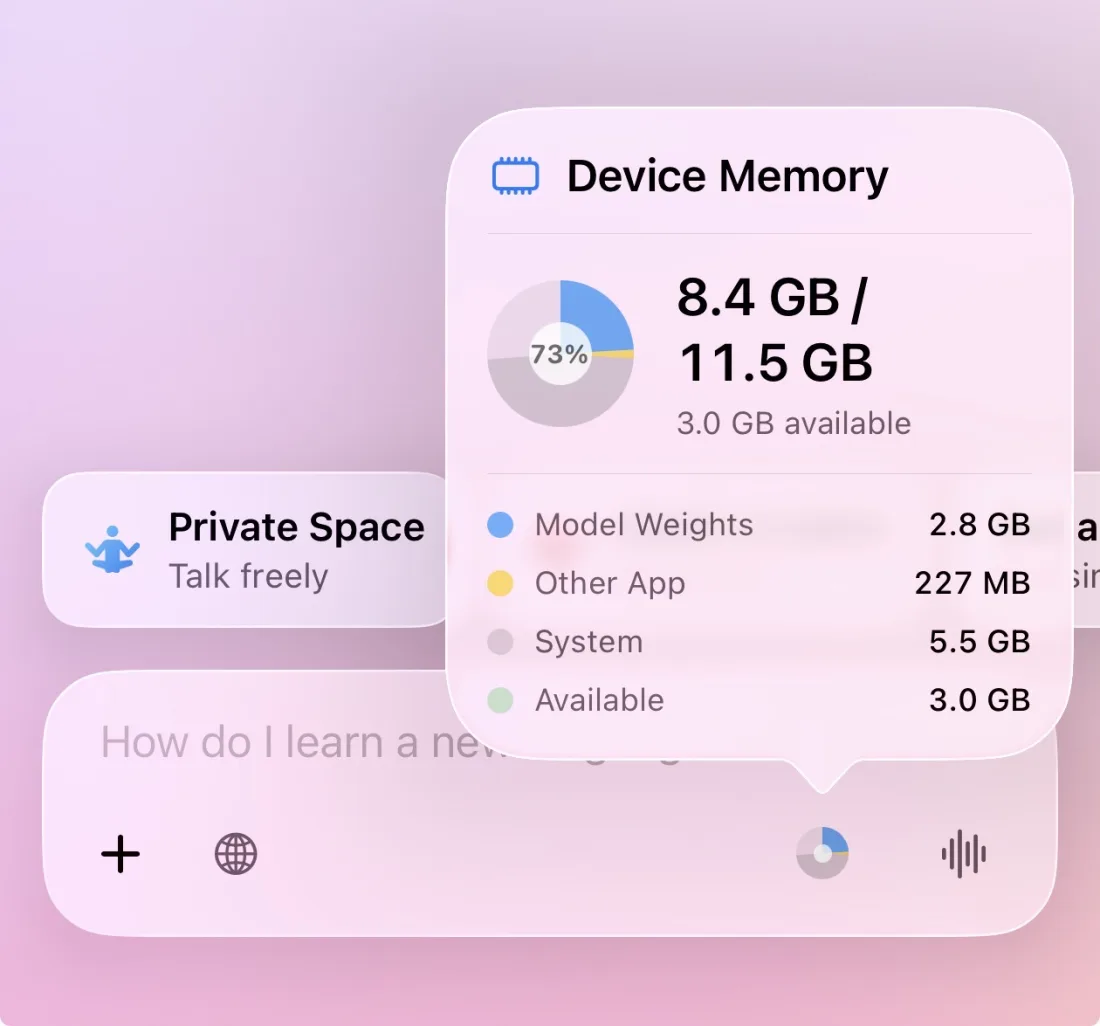
Device Memory Gauge
New memory breakdown shows model weights, KV cache, and system usage at a glance, with localized labels.
Date & Time Awareness
Models now know today's date and time, for more accurate, context-aware responses.
Apple Intelligence on LAN Server
Expose Apple's on-device foundation model as an endpoint on the LAN Inference Server, alongside your MLX models.
Stability & Performance
- Improved stability, much less likely to crash during long conversations or when using multiple features together (web search, images, health tools)
- Better memory management, the AI adapts to your device's available memory in real time, preventing out-of-memory crashes
- Cancel button works reliably, tapping stop during a response now works consistently
- Importing files no longer freezes the app, documents load smoothly in the background
- Faster generation stays stable, speculative decoding (2× speed mode) no longer crashes on longer conversations
- Startup crash prevention, in the rare case of a corrupted database, the app recovers automatically instead of getting stuck in a crash loop
Bug Fixes
- Fixed input field being locked when only Apple Intelligence was loaded with no MLX model present
- Fixed stuck streaming indicator after a crash, and prevented repeated crash loops on relaunch
- Reduced prefill step size to 512 to prevent out-of-memory crashes during prompt prefill with Gemma 4 MoE models
Version 2.0.1
April 2026
Download Server Mirror
- New setting to choose download server: Auto, Global, or China Mirror (hf-mirror.com)
- Auto-detects your region for the fastest downloads
Version 2.0
April 2026
LAN Inference Server
Turn your iPhone/iPad into an AI server. Load any model in Solair, flip the switch, and every device on your Wi-Fi can use it, just like OpenAI's API, but running entirely on your device.
See full details
How it works
- Enable the server in Settings > LAN Inference Server
- Any app that supports OpenAI or Ollama APIs can connect (Cursor, VS Code, Open WebUI, Python scripts, and more)
- Streaming responses, just like a cloud API
Compatible with
- OpenAI API, /v1/chat/completions, /v1/models
- Ollama API, /api/chat, /api/tags
Security
- Optional API key, generate a random key with one tap, or run without authentication on trusted networks
- Rate limiting, automatic protection against request flooding
- Connection limits, max 20 simultaneous connections
- DNS rebinding protection, blocks cross-origin attacks from malicious websites
- Credentials stored in Keychain, never in plain text
Setup guide built in
Includes connection instructions, code examples for Python and curl, and app-specific tips for Cursor, Open WebUI, and VS Code.
Good to know
- Server pauses when Solair goes to the background, keep the app open while serving
- Bonjour auto-discovery lets compatible apps find your server automatically
- Works over Tailscale for remote access
Add Models from Files App
You can now add MLX models directly through the iOS Files app. Place a model folder into the Solair models directory, restart the app, and it appears automatically in Your Models. Supports both author--model-name and author/model-name folder formats.
Version 1.9
April 2026
Smarter Model Selection for Your Device
Solair now automatically picks the best AI smart models based on your iPhone's memory:
- 12GB devices (iPhone 17 Pro, iPhone Air): Qwen3 4B + Qwen3 VL 4B for maximum quality
- 8GB devices (iPhone 17, iPhone 16, iPhone 15 Pro): Qwen3.5 2B + Gemma 3 4B for balanced performance
- 6GB devices (iPhone 15, iPhone 14, iPhone 13 Pro): Qwen3.5 2B + SmolVLM2 for reliable operation
New Input Bar Design
- Beautiful aurora glow effect around the input field
- Animated suggestions cycle through helpful prompts
Improvements
- Sidebar opens more easily with lighter swipe
- Better download management with queued models
- Improved local model sharing, better reliability and transfer speed
- Camera improvements
- Fixed memory leaks with remote server connections
- Better Apple Watch voice playback
- Improved translations across supported languages
Version 1.8
April 2026
Apple Watch App
Ask Solair from your wrist. Tap the mic, speak your question, and hear the answer. When Solair is running on your iPhone, queries are processed by your loaded local model. If the app is closed or your phone is locked, it falls back to Apple Intelligence seamlessly.
Local Model Sharing
Transfer AI models between your devices over Wi-Fi or Bluetooth, no internet needed. Great for setting up a new device without re-downloading gigabytes of models.
iCloud Backup Control
Option to exclude AI models from iCloud backup to save storage space.
Code Block Improvements
- Auto-scroll while AI generates code
- Line numbers for easier reference
- Syntax highlighting in edit mode
Accessibility
Improved VoiceOver accessibility for chat messages and settings.
Version 1.7.2
April 2026
Improvements & Fixes
- Health Tools now work better across all AI models, including Chinese/Japanese/Korean
- Unified Smart+Vision, use one model (like Gemma 4) for both, no reloading
- Fixed tool recognition for Qwen3 and other models
Version 1.7.1
April 2026
Bug Fix
- Improved stability when using web search with vision models (Gemma 4)
Version 1.7
April 2026
Gemma 4 Support
Added new Gemma 4 family models (vision-language model) with full image understanding and tool calling.
Voice Mode Improvements
- Improved multilingual TTS pronunciation (French, Portuguese, Chinese, Italian, Spanish, Japanese)
- Added espeak-ng G2P for better pronunciation across languages
- Per-language voice preferences now saved
- Better CJK (Chinese/Japanese/Korean) sentence detection
Code Features
- New code preview with live rendering for HTML, JavaScript, p5.js, Chart.js, Three.js, D3.js, Mermaid diagrams, SVG, CSS, and Canvas
- "Ask AI to Fix" button for code errors
- Syntax highlighting in code blocks
- Save and persist edited code
New Models
- Added Qwen2.5-Coder models (1.5B, 3B, 7B)
- Added LFM2.5 350M model, a tiny, reliable data extraction and tool use model
- Model family logos in the All Models list
Other Improvements
- Faster model downloads with accurate progress tracking
- KV Cache Quantization, new setting to reduce memory usage by up to 75% during long conversations, letting you chat longer before running out of memory
- Enhanced tool calling for Health Intelligence
- More improvements under the hood
Version 1.6
April 2026
10 Languages Supported
Solair is now available in Spanish, Chinese (Simplified & Traditional), Japanese, French, German, Korean, Portuguese (Brazil), and Italian on top of English.
Wikipedia in Web Search
Web search now includes Wikipedia as a knowledge source as an option with Grokipedia.
Version 1.5
March 2026
Web Search Improvements
Complete overhaul of web search. The app now intelligently rewrites your questions into better search queries, handles complex multi-part questions by searching multiple times in parallel, and shows you exactly which sources were used in a new collapsible card.
35% Faster Text Generation
Under-the-hood performance improvements for Qwen 3.5 models. The MLX engine now processes tokens more efficiently on Apple Silicon.
Thinking Mode Toggle
New thinking mode button lets you enable deep reasoning for models that support it, like Qwen 3.5. Only in manual mode.
Qwen 3.5 & Nemotron Models
Qwen 3.5 is back in Auto Mode with proper thinking controls. New Nemotron model support added for even more choices.
Better Tool Calling
Fixed issues with AI calling multiple tools at once and improved handling of complex tool parameters. Health queries and other tool-based features now work more reliably.
Smarter Memory Extraction
Choose between Smart (AI-powered) or Fast (instant) methods for remembering facts about you. Smart mode understands context better, while Fast mode offers instant results.
Advanced Generation Settings
Fine-tune responses with new parameters: Top-K, Min-P, Presence Penalty, and Frequency Penalty. Try the Qwen 3.5 preset for optimal settings.
Bug Fixes
- Fixed Voice Mode over Bluetooth connections
- Fixed Shortcuts integration issues
Version 1.4
March 2026
Personas
Chat with AI personalities tailored to your mood. Choose from built-in personas or create your own.
- Friends, Sam and Julia offer casual, supportive conversation like texting a real friend
- Historical Figures, Pick the brain of Einstein, Tesla, Da Vinci, Socrates, or Benjamin Franklin. Each speaks authentically from their era with unique insights
- Create Custom Personas, Create your own characters with custom names, personalities, and conversation styles. Built-in with a powerful AI creation tool
- Features iMessage-style chat bubbles, unique voice for each persona, and a beautiful golden selector in the sidebar
New Models
- Added Qwen 3.5 models (0.8B, 2B, 4B, 9B), latest efficient LLMs
Siri, Shortcuts & Widgets
- Ask Solair AI questions directly from Siri: "Hey Siri, ask Solair AI..."
- 15+ Shortcuts actions: Ask questions, translate, summarize, explain code, proofread, generate ideas, and more
- Works seamlessly with iOS Shortcuts app for custom automations
- New Siri & Shortcuts section in Settings
Voice Mode Improvements
- Faster AI response timing, reduced silence detection from 2.7s to 1.2s
- Thinking blocks now stripped from spoken responses
- Now 15 voices available (requires redownloading Kokoro)
Remote Server
- Added support for public HTTPS servers (OpenWebUI, etc.)
Speculative Decoding
Uses the fast model to speed up the smart model. Requires 2 models from the same family (e.g. Llama 3.2 1B and 3B).
Other Improvements
- Newly designed settings menu
- File size limit increased to 20 MB (from 5 MB)
- XLSX files now supported
- Better memory management for 8GB devices
- New option to enable web search by default
- Image results from web search
- Onboarding now lets you choose models or use defaults
- New Conversation Gesture, swipe left anywhere on the chat screen to instantly create a new conversation
Bug Fixes
- Fixed health tools appearing when HealthKit isn't set up
Version 1.3
February 2026
Health Intelligence
A groundbreaking feature: ask about your steps, sleep, heart rate, workouts, and more, all processed on-device.
- 9 data types: Exercise Time, Standing Hours, VO2 Max, Heart Rate Recovery, Walking Steadiness, Blood Pressure, and Menstrual Cycle with calendar visualization
- Weekly reports and trend analysis factoring in all available metrics
- All data stays on your device, never uploaded
Note: Health Intelligence is for informational purposes only and not medical advice.
Private Space
New prompt stack for personal conversations: emotional support, anxiety help, private journaling, relationship advice, and a safe space to vent. Everything stays completely on-device.
Remote Server
For power users: connect to your own LLM servers via Tailscale VPN. Supports Ollama, vLLM, and OpenAI-compatible APIs with auto-discovery and secure credential storage.
Expanded File Import
- PDF, TXT, CSV, JSON, Markdown, HTML, and 25+ programming languages including Swift, Python, JavaScript, and more
Mac & iPad Improvements
- Native Mac Catalyst support for better performance
- Optimized memory management on all platforms
- Improved layout and UI
Version 1.0 to 1.2
February 2026
Initial Release
The first versions of Solair AI, a private AI assistant that runs entirely on your iPhone and iPad. No servers, no accounts, no data collection. Chat with local LLMs, attach images and files, talk with Voice Mode, and get intelligent responses without ever going online. Super fast, built to be the best and most polished local AI app.